Your Pixel battery won’t charge at its fastest speed unless you enable this setting
When my phone is low on battery and I need a quick recharge, there are a few things I’ll do to speed up the process. The obvious one is to seek out a high-wattage fast charger that meets or exceeds the capabilities of my smartphone. Other tricks involve enabling dark mode, as OLED screens can turn off pixels to show true black and preserve power. I might also turn on Low Power Mode to get my phone to charge faster.
The idea of enabling Low Power Mode to achieve faster charging speeds isn’t just a gimmick. As your phone gets hotter, charging speeds get slower. These battery-saving features limit background processes that can heat up your phone during the charging curve. So why not make a battery-saving mode specifically for charging? That’s exactly what Google did for the Pixel 11 series.
Extreme Charging pushes speeds to the max
No need to use Low Power Mode while charging like the old days
Instead of turning on Battery Saver or Extreme Battery Saver when your Pixel 11 is low on battery, consider using Extreme Charging Mode. It’s a new feature for the Pixel 11 and later, and it can only be enabled while your phone is charging. It’s off by default, so you need to navigate to Settings → Battery and charging → Extreme Charging Mode → Turn on now to enable it.
If you try to enable Extreme Charging Mode without a charger connected, the button will be greyed out. It shows an Only available while charging message instead. The other Extreme Charging Mode requirement is that your Pixel 11 battery level must be below 50%. Otherwise, you’ll see another greyed-out button with an Only available when below 50% message.
So, what does Extreme Charging Mode actually do? Google says the feature “temporarily pauses background activities such as app updates,” and reinforces that you won’t miss any calls, texts, or notifications. It doesn’t go as far as Battery Saver or Extreme Battery Saver in pausing apps and features, but these two battery-saving features automatically turn off when your phone is charging.
While iPhones and Galaxy phones can use Low Power Mode or Power Saving Mode while charging, Pixel users can’t use Battery Saver while charging. Naturally, the new Extreme Charging Mode fills the gap left by Battery Saver when your Pixel 11 is plugged in.
Use the Extreme Charging tile in Quick Settings
You need to enable it every time you want to use it

There’s an Extreme Charging Mode tile available in your Pixel 11’s Quick Settings panel, but it’s hidden by default. To enable it, you need to manually enable Extreme Charging Mode in the Settings app. After the first time you activate Extreme Charging Mode, the tile will appear in Quick Settings for easy access. As a reminder, the Quick Settings tile will only work when your phone is below 50% charge and connected to power.
Unfortunately, there’s no way to set Extreme Charging Mode to automatically turn on when those conditions are met. You need to manually trigger it every time, either through the Settings app or Quick Settings panel on your Pixel 11. As for battery safety, Google says Pixels “automatically manages any temperature changes and keeps your battery within normal range” while Extreme Charging Mode is turned on.
The good news is that the Extreme Charging Mode toggle is easy to access in Quick Settings, and it’s simple enough to tap it after plugging in. Better yet, the feature keeps working after your phone’s battery level crosses that 50% threshold. You need to have a battery less than half full to get started, but Extreme Charging Mode stays on until your phone reaches a “high charge level.”
Extreme Charging Mode automatically turns off when you unplug your Pixel, so you don’t have to worry about leaving the feature enabled accidentally.
This Pixel 11 model benefits most from Extreme Charging
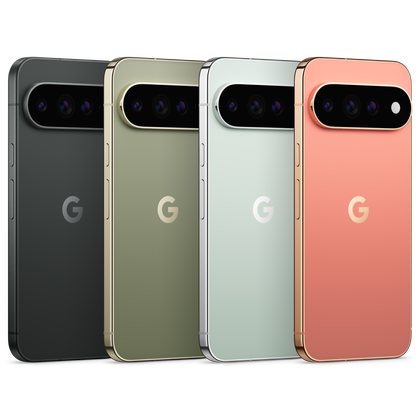
You can use Extreme Charging mode on any of the four phones

When it comes to Extreme Charging, one Pixel 11 model benefits more than the rest. That would be the Pixel 11 Pro XL, and it’s not hard to see why. The Pixel 11 Pro XL is the only model in the lineup with 45W fast charging support, and it has the biggest battery of the four devices. Both of those factors allow it to charge fastest when Extreme Charging Mode is enabled.
The Pixel 11, Pixel 11 Pro, and Pixel 11 Pro Fold are all capped at 30W wired charging speeds, and won’t benefit as much from Extreme Charging Mode. Still, it’s nice that Google made this fast-charging tool available across the entire lineup. Your phone charging a few minutes faster could make a difference when you’re rushing out the door and need extra juice.
-

- SoC
-
Google Tensor G6
- Storage
-
256 or 512GB
- Battery
-
4985 mAh
- Brand
-
Google
- Display
-
6.3-inch Actua display
- RAM
-
12GB
The starter Google Pixel 11 isn’t the flashiest Android phone of the bunch, but it’s the one that resonated with me the most. The slimmer camera bar makes the Pixel 11 feel modern and sleek, and it’s powered by the same Tensor G6 processor as the rest of the series. For $900, this is a solid Android flagship.
-
- SoC
-
Google Tensor G6
- Storage
-
256GB, 512GB, or 1TB
- Battery
-
5115 mAh
- Brand
-
Google
- Display
-
6.8-inch Super Actua display
- RAM
-
12 or 16GB
The Google Pixel 11 Pro XL is a premium Android flagship that pairs a massive, vibrant display with excellent cameras and a clean Android 17 experience. Battery life is dependable, and the new HiLight LED is a fun addition with plenty of potential.