I spent a week replacing my everyday Windows apps with open-source alternatives, and barely missed the originals
I’m a huge fan of free and open-source software. Whether it’s a productivity tool or an entertainment app, open-source apps are often among the best, if not the best, solutions.
However, at the same time, I’m a die-hard Windows addict and play many games that just aren’t available on Linux. So, I came up with an idea: let’s see what life would be like if I used Windows as my base OS but ran only open-source apps. The whole experience was far more enjoyable than I could’ve anticipated.
Open-source apps let you improve Windows without leaving Windows
More choice on your desktop
People often associate open-source apps with Linux because the OS itself grew out of the free-software movement and became a stepping stone for many looking for an alternative to proprietary software.
I’ve personally always been more of a Windows guy, even though I’m not a big fan of the OS or the company behind it. Whether it’s for work or personal use, I’m just used to Windows, and the fact that most apps and games just work on it without me having to think about it is a huge plus.
However, just because I have no intention of switching away from Windows for the foreseeable future doesn’t mean I can’t give everything else in the open-source world a shot. I already use some open-source apps on my home server, phone, and PC, and they’re some of my favorite apps out there. My day would look very different if I didn’t have Jellyfin or the Breezy Weather app to check the forecast on my phone.
Part of the reason why FOSS (free and open-source software) tends to be so great is that the people who contribute to these projects genuinely care about the experience and want to make it better for everyone, with profits taking a backseat. But perhaps the biggest benefits are the freedom, privacy, and independence from proprietary apps that can pull the rug out from under you through business decisions such as putting previously free features behind a paywall.
So, I took half an hour to find the best open-source alternative for each proprietary app I use on my Windows PC, and thus began my experiment.
I put open-source alternatives to my everyday apps to the test
The web browser switch made the biggest impression
As a writer, the two most important apps on my PC are my web browser and the app I write in, which is currently Obsidian. Chrome has been my primary browser since 2009, and every time I switched, its familiar interface and unmatched performance brought me back.
So, when I set out to replace it with Mozilla Firefox, a browser I hadn’t used in 17 years, I expected a pretty big adjustment. To my astonishment, it was one of the easiest switches I made. I simply imported my settings and passwords from Chrome, and within seconds, Firefox was starting to resemble the familiar browser layout.
As I used it throughout the week and logged into my accounts, the experience was great overall. The only minor downside was that Chrome was slightly faster on some websites I don’t usually visit, while most others felt just as fast in Firefox. Best of all, Firefox used a fraction of Chrome’s CPU and RAM, especially as I kept adding more tabs.
As for Obsidian, I replaced it with Joplin, one of the best FOSS note-taking apps. It supports Markdown and even has native rich-text support, which Obsidian lacks. After adding a few lightweight plugins and getting used to the new layout, Joplin seamlessly blended into my day-to-day routine.
Apart from browsing the web and writing, I also occasionally take screenshots and edit photos. ShareX replaced the combination of Windows’ built-in Snipping Tool and Screenpresso that I used before. Just like with Joplin, it took me a few days to get used to the new layout, but it eventually blended into my workflow. I particularly liked some of its built-in tools, such as the color picker and ruler, which largely replaced Windows PowerToys for me.
As for photo editing, I haven’t actually used Photoshop in years — GIMP has been my go-to photo editor for a while now. It’s a surprisingly powerful editor that supports layer-based editing, though I mostly use it to retouch photos. I’m probably the only person who didn’t get excited about the vibe-coded Adobe suite because GIMP was already doing everything I needed.
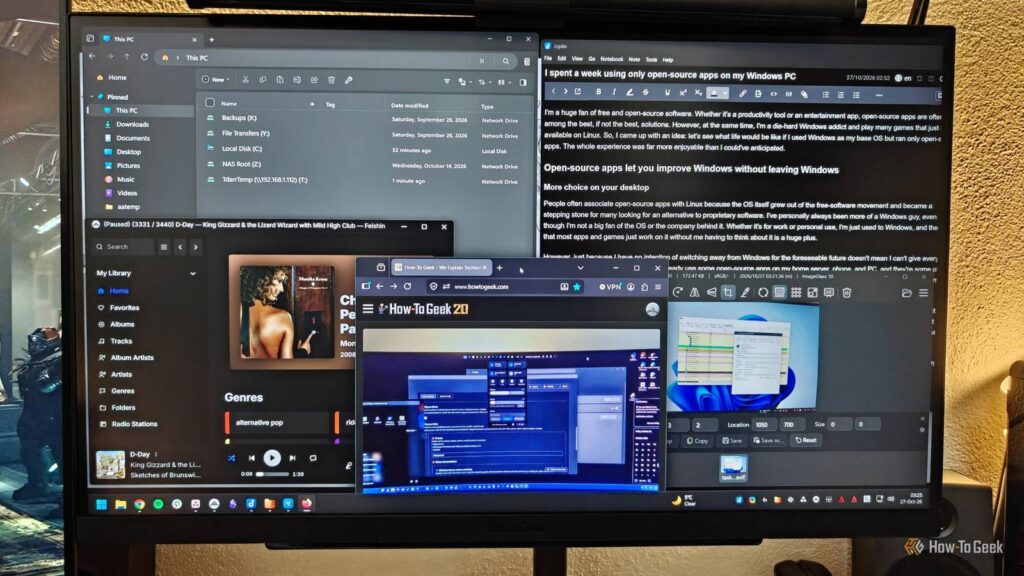
Music was a little trickier to replace. This is because Spotify offers a massive, ever-growing catalogue and curates playlists for me every day. Thankfully, I’ve already been working on growing my own music library powered by Jellyfin, so as long as I keep adding fresh music, I should be able to replace Spotify with Feishin completely.
Some of Windows’ own apps are the best argument for looking elsewhere
Even the built-in tools have room for improvement

You probably don’t think much of Windows’ built-in apps. For the most part, they’re pretty basic and get the job done. But once you start digging, you’ll learn that there’s an open-source alternative for almost anything, even stuff you don’t normally think of.
I’ve already mentioned Snipping Tool, but this list of replaceable apps includes even things like File Explorer, Task Manager, and Windows Search. I’ve already used Files, System Informer, and Flow Launcher in place of these, and they’re all far more feature-packed than what Windows has to offer. They’re a power user’s dream.
Files is probably my favorite of the bunch. It looks and works just like File Explorer but adds a few nifty features on top, like a dual-pane view for browsing folders side by side, column view, a powerful archive manager, and additional customization options.
The only app I hadn’t tried to replace before, mostly because I really like it and am used to it, is Photos.
Admittedly, I’m a bit partial to Photos and use it extensively to browse my gallery and crop, resize, and touch up photos that don’t need much work, so this was a tough one to crack. I tried a few apps before eventually settling on ImageGlass.
The first thing I noticed was just how quick it was. I thought my PC was slowing Photos down when the app had to open several high-resolution photos at the same time, but it turned out that the app was to blame. Cropping and resizing photos took me some time to get used to, as the process is a little different from Photos.
You don’t need to switch to Linux to get into FOSS
After going through this little experiment, the biggest takeaway for me was just how easy it was to switch from proprietary apps and Windows’ built-in tools to open-source alternatives. Firefox was the biggest surprise, Joplin felt like a natural replacement for Obsidian, while apps like ImageGlass, ShareX, and Files improved my day-to-day experience with the OS.
The point is, open-source apps have come a very long way, so if there are apps you use regularly but have some grievances with, now is the time to see if there’s an open-source alternative.